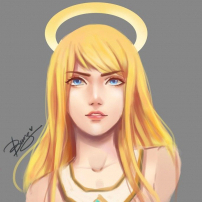
Missprite 29 Posted February 16, 2020 Share Posted February 16, 2020 (edited) “ Hi, I’m Bloom Heart, liable of freshness and sweet aroma of all living things that bloom here on Arinar. Why are you looking at me ?! Do you know my father ?! Do you know me ?! Ohh is it because of my dress ? I’m just a child so simple but loved. Let me tell you a story how this dress was made. ‘ Once, there live a half man born from the cracked bamboo named Gloom Heart. Ever since, he was gloomy after the last necromancer cursed him to never ever be happy. In his great sadness while invoking a magical spell for his plants – the spell is to make the flower bloom --- there’s a small bamboo sprouting from his tears and that’s where I came from. He took care of me and dressed me. He gathered the finest silk and attached it in my arms to keep me warm. Big, cottony durable leaf for my dress that will last forever. Since I’m naturally born from nature, flowers grew around my hips and some on my head. Birds attracted to me because of my sweet aroma ~~ teehee. Ahm that’s it for now because father Gloom Heart calling me now. See you around in Arinar. “ (Missprite – US Sapphire) Edited February 16, 2020 by Missprite Brutaminos, capcom, Уточка and 1 other 3 1 Quote Link to comment Share on other sites More sharing options...

Recommended Posts
Join the conversation
You can post now and register later. If you have an account, sign in now to post with your account.
Note: Your post will require moderator approval before it will be visible.