Szarx
-
Posts
4 -
Joined
-
Last visited
Szarx's Achievements

Rookie I (1/27)
0
Reputation
-
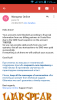
Hey guys, I used to be a rogue called Heternal lvl 22 in eu emerald, and sometimes I use the phone of one of my friends to play with, someday he told me that my account were blocked and his accounts too, like a normal person I send a ticket to the support, but that doesn't work for nothing they want me to pay for the fraud of my friend and now they're just ignoring my tickets to the support, in the screenshot you can see what they told me, I tried to explain but it was useless I told them " I didn't buy anything was my friend not me pls unblock my acc" but they say "that's not enough information to unblock you account good luck" I wanna know if I'll have my acc back or something. Thanks and apologies for my bad English.
-
she just looking for attention, kill low level players, anger can not do quest in peace
-
:facepalm: Venere :facepalm:
-
 :facepalm: aigrind just think more money :facepalm: