TsaiLim
-
Posts
15 -
Joined
-
Last visited
Never
Everything posted by TsaiLim
-
sorry... you place not here .. bye
-
copy??? huh :facepalm:
-
:facepalm:
-
like the colors....
-
I like the witch bloom on he wpn... looking nice...
-
is look very same style persone id whit this.... http://forum.warspear-online.com/index.php?topic=91804.0
-
For... snorlx or developer... pls cheak again... I'm afraid if same person use other id for make other new costum.( so they can get dobel price if win). becouse im very wonder why. and why newbie can use color in front and change the size.. not only just that... look the image this ppl upload... did you feel something awkward??? did u see?? this newbie make it like pro.. id ... pls chek it again... sorry my bad engglis .... but only just fair :)
-
:P
-
sure :)
-
thank you..
-
you costum is good.. pls comment my costum too ;) http://forum.warspear-online.com/index.php?topic=92099.0
-
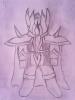
NAME COSTUM : Guardian Knight Element of body: - Helmet of Guard Slayer - Plate Amor Guardian - Cloak of Hunter - Boost of Empire - Gloves of Hell Army All of this elemmet stuff I make it in this costum.. hope all of you like.. __ pls give commet and thank you __
-
:cray: bye
-
uh... something worng whit my emblem? :blush:
-
my emblem: This picture shows: the dragon is a legendary creature that has always appeared to be the strongest creature in the legend. as well as the greats will be gulid mighty legend. and when a new force joined the great power will be a force infinitely!!