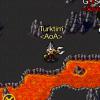
kaanberk 22 Posted August 3, 2015 Share Posted August 3, 2015 (edited) herkese selamlar Bu konuyu actim çünkü Türkçe forum'da fazla hareket olmadiginde gördüm , sayin mod Lar. Ben bir etkinlik düşündüm , bu etkinlik oyun içi tarz ( kiyafet ve staff skin ) sizce de hoş olmaz mi? Oyunun bir köşesinde çekilip fotoğraflarını buraya atasınlar hem diğer etkinlik göre daha kolay olmaz mi? Sizde en tarz olani secersiniz . (Tabi oldulü olsun) Tabiki 1 kural var oda :sadece kendinin kostümlerini cekilebilirsin ! Sizce de kolay ve daha yatkin değil mi? Örnek :Tarz Edited August 3, 2015 by kaanberk Legionn 1 Quote Link to comment Share on other sites More sharing options...

Recommended Posts
Join the conversation
You can post now and register later. If you have an account, sign in now to post with your account.
Note: Your post will require moderator approval before it will be visible.